
One might wonder, why I did this this way.. if my previous oldwebhost has been compromised, I can’t just download everything and then reupload on the newwebhost. Because there is a high probability that whatever hacker hacked my other domains that were totally wiped out, like “sleeper scripts” the other websites in the same webhost will also infect the other ones. So I did a completely NEW WP Core Installation.
It’s like building a brand new website. That’s why I put 2018 website. And this CLG . ORG version is the mirror site, as I was replicating MANUALLY, the contents and structure of CLG . COM.
And of course in the process, I will come across the “quirks” of the new WP Installation. Like this one ..
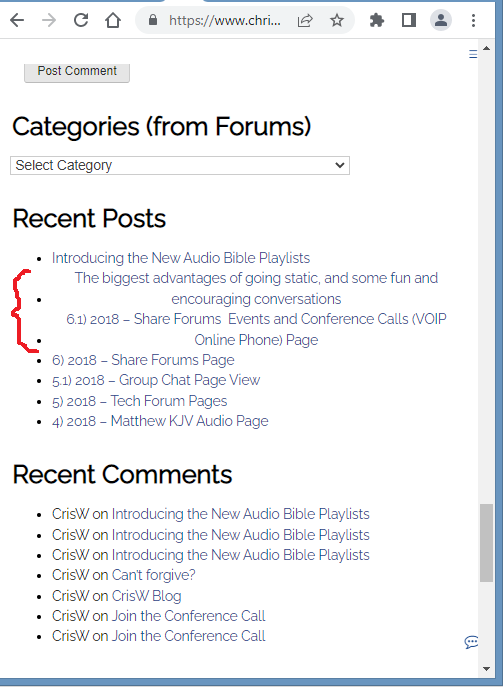
This is an issue with prior versions, where long links automatically center. And since my other older TEch Domain got COMPLETELY wiped out and overwritten with one click installs of the oldwebhost, the CW Code snippets got wiped out too.
I figured it out then, and I will figure it out again. I saw and noticed that above last night when I was testing on my mobile phone, so I just “shrunk” the window earlier, and saw it also, in the above screenshot.
So let me publish this first, and then I will just add the fix below in the comments section.
Here you go, it’s fixed.
Here’s the code I wrote: (with comments LOL! So I know what it’s for)
/* Top Container Area became white for some reason! Sloppy oldhost tried to replicate my CW theme, they probably thought it was in the WP Theme portals . Here's how to FIX the Alignment in Recent Posts*/
section#recent-posts-2.widget.widget.widget_recent_entries a[href^="http"]:not([href*=" "]) {
display: inline-block;
text-align: left;
word-break: break-word;
overflow-wrap: break-word;
white-space: normal;
max-width: 100%;
}
In the previous versions of the forums, I tweaked the long links to just automatically have ellipsis , the dot dot dot… But I like the long links to display like above. So … there you go.
Done. done. done. On to the next!